Everything from your hands-on Claude session — the tools, the workflows, the answers to what your survey asked, and a clear plan for the next 30 days. One place to come back to.
The whole room asked the same question, so let's settle it first: what's private, and what does the team see?
Anything you type in a normal chat is yours. Nobody else on the team can see it, and it isn't used to train the model on Team. This is where you ask the "dumb" questions, vent, or think out loud.
Rule of thumb: if it's just you working something out, keep it in a chat.
The moment you create a Project and invite people, everything in it is visible to that group. Projects are where you build shared, repeatable work — client briefs, standard decks, team knowledge.
Made a Project that should've been a chat? You can delete it. No harm done.
Go to Claude first — before you start thinking about anything. The strongest users reach for it for almost everything, because it gets richer the more you use it. Don't ask it only what you already know — ask it your blind spots.
Five quick installs. Do these before anything else — they're what turn Claude from "a website I visit" into part of your desktop.
Download Claude for Mac and run it as an app, not just a browser tab. It's the front door to everything below.
Install the Claude extensions for Chrome, Word, PowerPoint and Excel. Now Claude lives inside the documents you build, not in a separate window.
It can control your browser as if it were you — open Outlook online, check what appointments are free, fill things in. Anything you can do online, it can do.
The big one. Cowork takes control of your computer, reads your files, and builds things for you. Needs the newer install — let it grab that. (You can't use the machine while it's driving — just watch the cursor move.)
You just got Team this morning, so your good chats are still on your personal account. There's a fast way to export and selectively move that history into the corporate Team account — Shane is sending the steps. Don't lose the work you've already done.
These are the workflows we walked through live. Each one removes a specific chunk of manual work you're doing today.
Right now your reports are spread across the DAM, the shared drive, and (honestly) people's desktops — with no shared taxonomy, so the same thing gets filed three different ways. Pull it into one place, then point Cowork and your Projects at that folder. Cowork can even help you organize and re-file it.
Build an Artifact for your standard client brief and feed it ~10 of your best examples — only the good ones. It learns your definition of great and produces briefs in that shape every time. Connect Figma so your brand guidelines flow straight in.
Artifacts live inside Claude under your Project — new artifact → document/template → create.
Record consultations and meetings instead of typing notes. The pipeline: Otter (or Granola) → Zapier → a shared Google Drive → Claude's memory file. You're on Microsoft, so just push the transcript to a shared Google Drive and pull it into Claude.
Verbal request from a member? Record it — don't paraphrase from memory.
Claude's own image generation isn't its strength yet — so connect it to Nano Banana (~$10/month) for strong, on-brand images. Bigger picture: as everything shifts to Gen-AI, the win is a brand brain that keeps every image, ad and package anchored to the brand instead of drifting in a million directions.
Simulate your audience
"Simulate me giving this presentation to a Think TV audience — what will they like, and what won't they?" Then rework a deck you built for one client to land with another.
Deep Research
Turn on Deep Research for genuinely thorough, multi-source answers — competitive scans, category reads, background you'd otherwise spend a day on.
Synthetic research
Test a concept against a synthetic sample in hours. A quick read is ~70% accurate; tuned on Hotspex's 20 years of data it climbs to 90%+.
A skill is a reusable agent — a packaged way of doing a recurring task in your voice. Once it exists, you just call it.
Just say "I want to build a skill" — Skill Builder walks you through it. Or do a task brilliantly once, then say "please make that a skill."
Lost track? Ask "show me a list of all my skills." They're indexed for you.
Say "share my skill with my colleagues." On Team, skills can be shared so the whole group works from the same playbook.
Your Team plan has far more credits than a personal account — but the model you pick controls how fast you burn them. Use the top model (Opus) for deep writing and hard thinking; drop to Sonnet for simpler tasks like quick maths or formatting. Same chat bar, just switch the model.
These are the real questions and frustrations from your team's survey and the session. Each answer points to the exact thing on this page that fixes it.
This is the single most common frustration in your survey, and it usually comes from bouncing between tools — write in one, slide in Gamma, image in another — so nothing ever fully resolves. Two changes fix most of it:
1. Keep everything in Claude. Stop the Gamma → ChatGPT → Gamma loop. Build the deck in Claude, polish it with the PowerPoint extension right inside the file ("find typos, make every slide look the same, suggest new images"). It won't hit 100% on its own — the human still closes it — but it gets you most of the last 10% instead of looping.
2. Teach it your bar. Put 10 of your best examples into an Artifact so it learns what "great" means to you. And pressure-test before you ship: "simulate me presenting this to [the actual audience] — what won't they like?"
Fixed by → Artifacts, keeping work in Claude, and "simulate my audience."
Native image generation isn't Claude's strength today. The move is to connect it to Nano Banana (~$10/month) — just ask Claude to connect it — and generate from there, on-brand. ChatGPT's image generation is also strong right now; expect Claude to catch up in a couple of months.
Fixed by → Images & the brand brain.
Yes. Ask Claude "how do I connect Figma," authorize it, and your whole Figma comes in as brand guidelines. From there, everything you generate references the brand — the first step toward a true brand brain.
Fixed by → Client briefs & Figma and the brand brain.
Both. Turn on Deep Research for thorough, multi-source answers. For concept testing, synthetic-sample research gives you a read in hours — roughly 70% accurate off the shelf, 90%+ when tuned on Hotspex's data. (That tuning is where we come in.)
Fixed by → Power moves: Deep Research & synthetic research.
Yes — this is exactly what Cowork is for. Consolidate everything into one shared drive, connect it, and Cowork can re-file, tag, and organize it for you. The prerequisite is getting it into one place first.
Fixed by → Organize your data into one place.
The best users reach for it for almost everything — and they ask it their blind spots, not just what they already know. How to start: don't wait until you feel ready. Work it into everything you do, starting now, and you get better fast. Nobody rides a bike well on the first try.
Fixed by → "Go to Claude first" and your 30-day plan.
Honest answer: yes, it becomes load-bearing — you'd survive without it, but you'd feel it. On getting unstuck: Claude itself nudges you along when you ask, this hub is your reference, and Shane is a direct line. The "geek squad" idea is a good one — it's effectively what these sessions are.
Fixed by → this hub, asking Claude directly, and follow-up sessions.
Note: one survey ask — building your member-intake survey tool — is a bigger custom build. Shane is handling that one directly with Andrea rather than as a self-serve step here.
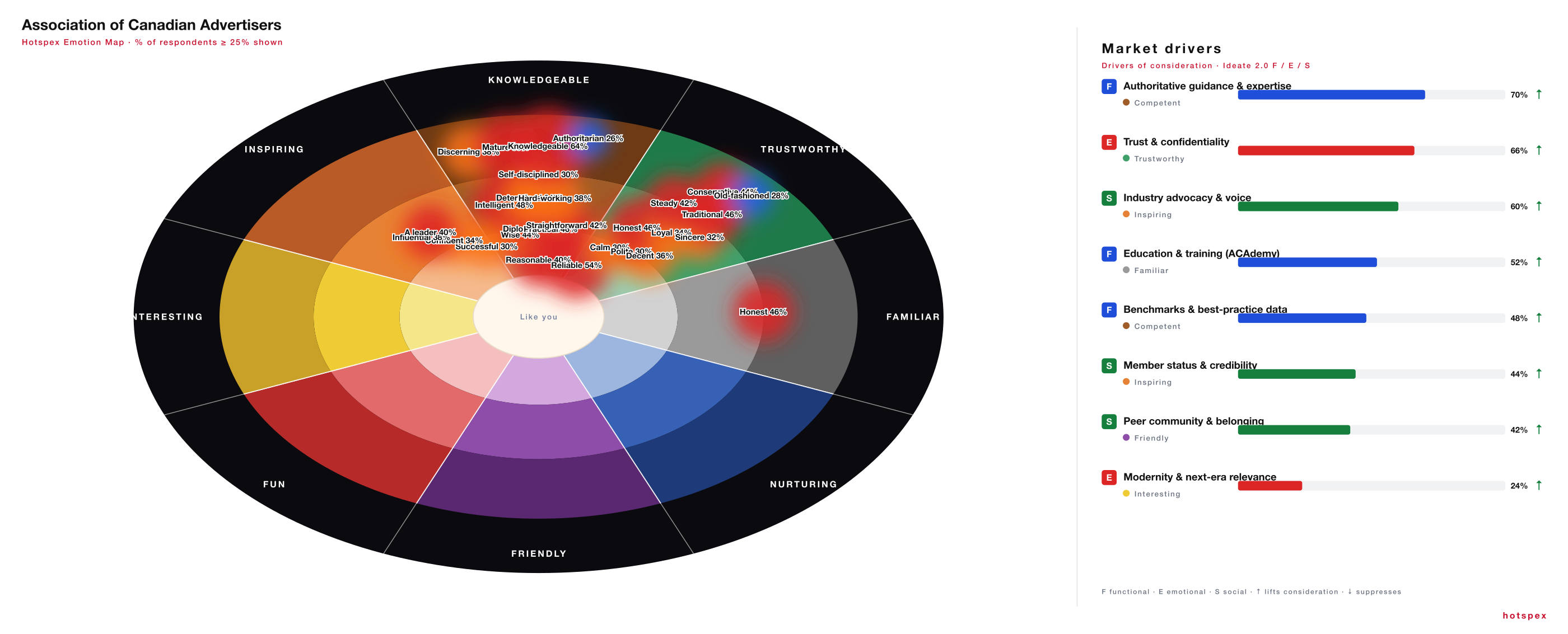
You asked for a heat map of the ACA brand — here it is. It reads heaviest in Competent and Trustworthy (knowledgeable, reliable, the credible authority) with the lower, warmer half of the wheel still cool.
This is the kind of artifact a skill produces on demand — and the same engine that becomes a brand brain for your members' brands. Grab the skill below ↓
Click the map to view it full sizeShane's actual skills, ready to drop into your own Claude. Each is a .zip — unzip it into your ~/.claude/skills/ folder (or just ask Claude "install this skill" and point it at the file). The guides below are step-by-step PDFs you can keep.
The skill that built your brand map above — wheel, heat, and Market Drivers panel.
↓ Download skillTurn a meeting transcript straight into a finished output — pairs with your capture pipeline.
↓ Download skillYou asked about these in the room. They're a notch beyond the basics, so they're better as a live walkthrough than a written step.
Reads team email tone and maps each person's emotional signature on the Hotspex Map, then coaches you on how to work with each of them. Shane can demo the build.
Your Brand Singularity living inside Claude, Adobe and Google — so every AI-made asset stays anchored to the brand. The single biggest marketing question of the next two years.
Claude connects to HubSpot (and most tools) — "what's the latest activity on this account?" answered straight from your CRM.
Get a tuned read on a new product or campaign in hours, not weeks — the Hotspex-calibrated version, not the off-the-shelf 70%.
Your members can't get your data from Claude or ChatGPT. Wrap it in an agent only they can reach — that's the association's moat as everything goes Gen-AI.
Shane's holding one back for the right moment. Ask him.
Your progress saves to this browser automatically.
Pop in your work email so Shane knows who's using this and can help you directly. Takes a second.